
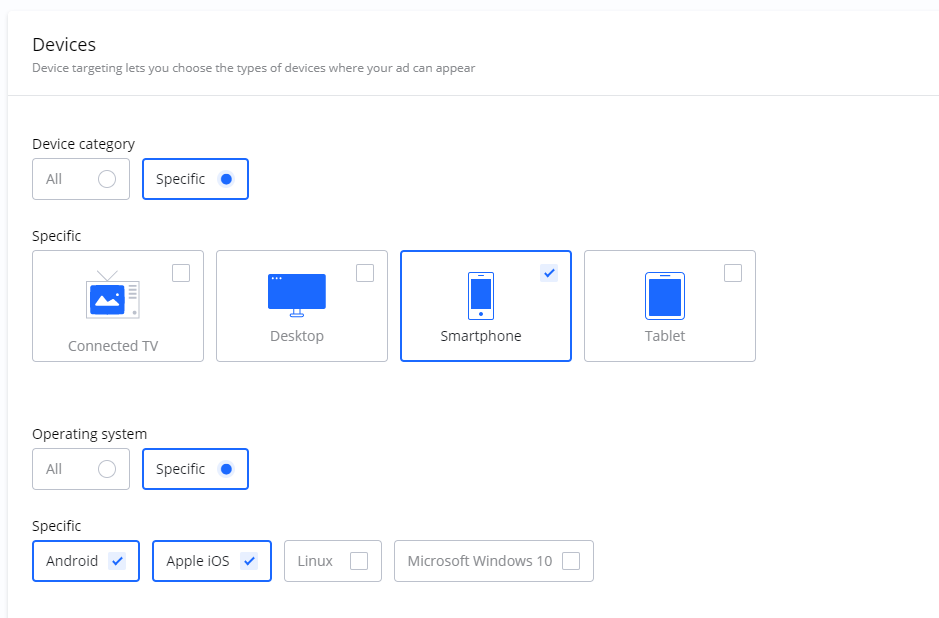
Device Targeting allows you to show your ads specifically to users based on the device and/or operating system they are using. This is particularly useful if your Campaign or landing page is designed for a specific type of device (e.g., a mobile-only app install ad).
This feature is typically composed of two parts:
|
Targeting Component |
Description |
Examples |
|---|---|---|
|
Device category |
Allows you to target the general type of device. |
Desktop, Smartphone, Tablet |
|
Operating system |
Allows you to target the specific OS running on the device. |
Android, iOS, Windows, macOS |
You can use these options together to be highly specific. For example, you could create a Campaign that will only be shown to users on Android and Apple (iOS) smartphones.
Frequently Asked Questions
Q: What is Device Targeting?
A: Device Targeting is a feature that lets you show your ads only to users on specific devices (like smartphones) and/or operating systems (like Android).
Q: Can I target only smartphones?
A: Yes. You would use the Device category option to select "Smartphone" and leave the Operating system options unselected if you want to include all smartphone operating systems.
Q: Can I target only users with an iPhone?
A: Yes. To do this, you would combine the options: select "Smartphone" from the Device category and "iOS" from the Operating system list.